How to build a rock, paper, scissors game with GitHub Copilot

In this tutorial, we will build a rock, paper, scissors game with GitHub Copilot. We will also explore GitHub Copilot, a cloud-based AI tool that assists users of various editors in suggesting lines of code and whole functions instantly. We will discuss how Copilot has redefined productivity for millions of developers, and the benefits it provides. This tutorial includes the use of CodeTour, a VS Code extension, that allows developers to create and follow a guided walkthrough of a codebase. Let's get started!
What is GitHub Copilot?
GitHub Copilot has helped redefine productivity for millions of developers by introducing them to the magic of AI assistance. GitHub Copilot is a cloud-based artificial intelligence tool developed by GitHub and OpenAI to assist users of Visual Studio, Visual Studio Code, Neovim, and JetBrains by suggesting lines of code and whole functions instantly. With Copilot, you can write a regular expression or interact with an API for the first time without leaving your editor.
Why I love GitHub Copilot
GitHub Copilot boosts productivity because it helps developers spend more time thinking about the theory they are building than about the code itself.
However, beyond productivity, GitHub Copilot helps provide me with psychological safety. Psychological safety refers to the belief that you can speak up, ask questions, make mistakes, and contribute without fear of punishment or humiliation. When employees feel safe to learn, ask questions, contribute, and lead, it boosts the team’s and individual’s overall confidence, morale, and performance.
Unfortunately, the reality is psychological safety is not always common at work. When I’m feeling uncertain about asking for help, or I’m not even sure how to word my questions, I can use GitHub Copilot to help me:
Brainstorm ideas when I reach a mental block
Jog my memory
Retain focus
Determine if I’m going in the right direction
Why would I build a rock, paper, scissors game?
I did this for fun
I did this to build my Python skills. I’m a baby Pythonista. For the past 5 years, I’ve been writing different forms of JavaScript on the frontend and backend, but ever since I started using GitHub Copilot, I’ve taken up an interest in Python. And I want to continue to read, type, and navigate code written in Python. It’s a less verbose language than JavaScript, so it feels easy for me to learn.
I wanted to create a short, fun activity to help folks learn how to leverage GitHub Copilot because it’s not always obvious how to get started. Hint: Provide as much context as possible through comments and lines of code.
I remember building a rock, paper, scissors game when I was in a coding bootcamp back in 2018. At the time, the logic seemed so difficult. I’m hoping this can be a helpful tool for developers who are learning to code.
I want to continue to creatively use GitHub Copilot for different situations to understand its limitations and strengths.
To complete this tutorial, you will need:
Access to GitHub Copilot
Open this repository
How does this work?
The CodeTour prompts developers to write comments and lines of code that trigger GitHub Copilot to generate code to create a rock, paper, scissors game.
What is CodeTour?
CodeTour is a VS Code extension developed by my amazing coworker, Jonathan Carter! It allows developers to create and follow a guided walkthrough of a codebase.
What you will find in this repository
In this repository, you will find:
a
main.pyfile with no contentsa devcontainer that installs CodeTour and GitHub Copilot when the Codespace is created
a CodeTour to guide the developer through using GitHub Copilot to develop a rock, paper, scissors game.
How to use the guided CodeTour
Navigate to this repository that I created. Then follow the instructions below:
Step 1
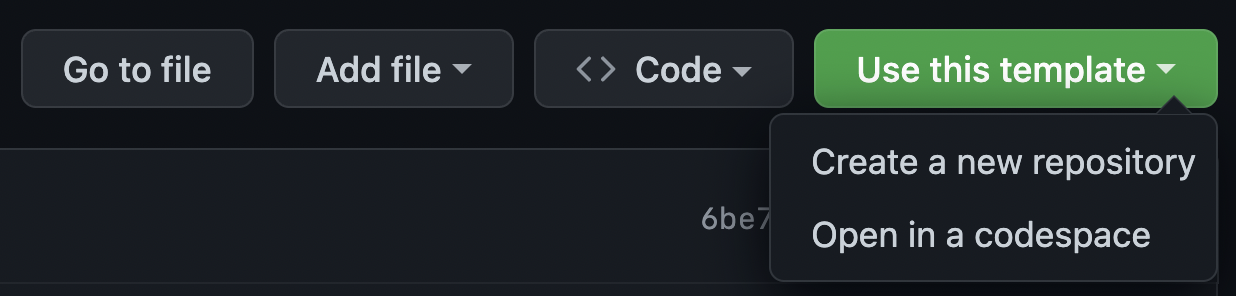
Choose 'Use this template', and 'Open in a codespace'
Step 2
Choose the “Explorer Icon” on the left sidebar of your editor.

Step 3
Toggle the CodeTour panel

Step 4
Press the “Play button” to start the tour.

Step 5
Your CodeTour will begin! Follow the CodeTour’s steps to learn how to use GitHub Copilot.

Your CodeTour will take you through the following steps
Step 1
Introduction: Hi there! this is a guided tour to help you learn GitHub Copilot. We will build a rock, paper, scissors game with Python.
Step 2
Let's give GitHub Copilot some context about what we're building. Write this comment # Write a rock, paper, scissors, game at the top of your main.py file.

Now, let's prompt Copilot to import the random module. Write this comment # import random module on the next line. Press enter to create a new line and accept Copilot's suggestion.

Step 3
Now, let's prompt Copilot to create a main function that handles the logic of the game with a comment that says # define main function that handles all the logic. Press enter to create a new line and accept Copilot's suggestion.

Step 4
Now, let's prompt Copilot to call the main function. Write this comment # call main function on the next line. Press enter to create a new line and accept Copilot's suggestion.

Step 5
Try it out! Let's run the code to see if it works. In your terminal, run python3 main.py. It should start the rock, paper, scissors game. Mission complete! You've used GitHub Copilot to create a rock, paper, scissors game in Python!

Do you have feedback?
Feel free to create an issue in the repo or comment below!! There’s definitely room for improvement, as this is my first time using CodeTour to guide people through GitHub Copilot.
Follow GitHub and me for similar content about GitHub!
About the author
Developer Advocate @ GitHub
Comments
Join the discussionI enjoyed this to learn a bit about co-pilot for the first time. The biggest suggestions I have for your article are 1) there is a time delay before code suggestions are made from co-pilot, I didn't realize this at first and thought it wasn't working. 2) The code it suggests might not look exactly like yours as there are a few different suggestions it might make. 3) to view those suggestions once co-pilot has made a suggestion 'ctrl+enter' will open a new tab with multiple selections to choose from.
This is good feedback! Thank you!
GitHub Tutorials
In this series, I will document technical tutorials for navigating GitHub's awesome features!